Warframe's "Optimize Install" Feature
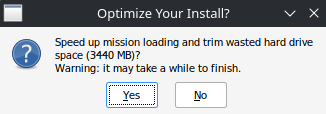
This is a prompt Warframe sometimes displays after an update. As the windows states, clicking yes will begin "optimizing" your install over a few minutes to 10s of minutes. But Warframe never tells you what this optimization is. Do you ever need to optimize? Will it speed up your game? Will it help Warframe finally leave Beta status?
Warframe's Files
Every video game, at some point, needs to deliver an update. To fix a bug, to add new content, maybe even remove content. And each video game has a unique answer to the question: "how do I update myself"? Video games nowadays are massive in size, often reaching 10s or even 100s of gigabytes in size. Updates to games must be quick, but also not incur other downsides. Warframe has a unique solution to this question that gives some control to the player, offering a tradeoff between storage space and speed.
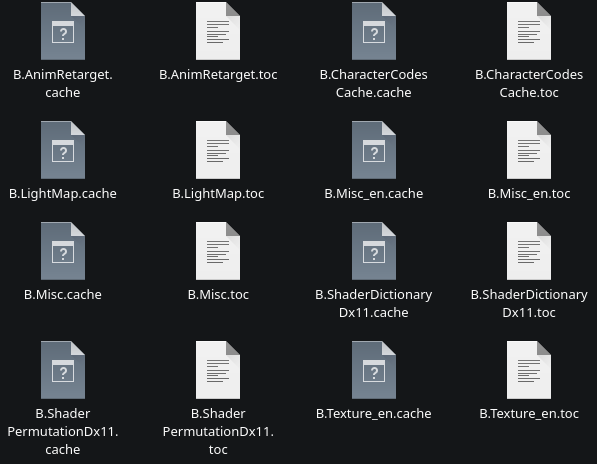
Inside Warframe's installation is a Cache.Windows folder. Contained in that is an assortment of files ending in .toc and .cache. And contained inside these files are virtual files (assets) of 3D models, textures, levels, materials, shaders, audio files, etc. When running, Warframe will open these .toc and .cache files to load assets. When floating around the Orbiter, it'll load the level/model/textures/audio for that scene. When Lotus pops up on your screen annoying informing you of the current mission, her 3D model asset is loaded. In the same regard of loading assets individually, they can be updated individually.
Updates?
So what happens when Lotus's 3D model gets an update?
We know the .toc/.cache files contain assets. In fact, it's just a list of assets laid out sequentially (an asset list, if you will). An important property to note in the world of computers: files have a beginning and end. The beginning is a fixed point, but the end may be moved, allowing the file size to be shortened/extended. Especially important to note for video games.
So hypothetically, let's say Lotus gets an update that takes her model from 1MB to 2MB. Her 3D model is located dead center of the asset list. To make room, we'll just shove data over to make the 1MB space grow to 2MB. But wait, that sounds horribly inefficient! Especially if the file she's located in (F.Misc.cache) is 8GB in size! That means we'll have to shove over 4GB of data to make room! And what if her asset is located at the beginning? We'll need to move 8GB to make room! Of course, Warframe doesn't actually do this every time an asset is updated.
There are essentially 2 types of operations when updating an asset:
- The asset is added.
- The asset is removed.
For the case of Lotus's model updating, this is a combination of 1 and 2. We must delete the old asset, then replace with a newer one. Warframe has decided we cannot replace sections of an asset, an asset is the lowest unit we can manage. Even if only a small change, we must replace the entirety of the asset.
Option 1 is actually easy - the asset can simply be appended to the list. Your computer must allocate space for new data, but it's not necessary to re-arrange contents inside the .toc and .cache files.
Option 2 - The Asset is Removed
Like I mentioned before, we cannot simply resize an asset list to add/remove space; that can be very costly. So instead of deleting data, Warframe will only "mark" the asset as removed. When starting Warframe, the engine will completely ignore marked assets. But if these assets are only marked for deletion, their data still exists on your computer, right? It seems wasteful to leave the removed asset lying around… Hmmm… "Wasteful", where have we heard that term before?
Returning to this window, the number displayed is simply the sum of all assets marked for deletion. When you accept the prompt, Warframe will begin the costly process of pruning marked assets. If all assets exist in the beginning of the list, this may take lots of time. If all assets exist at the end, this can be quick. But most often it will be a mix. And to note, the total size of "wasted space" is only slightly correlated to the prune time. Locations of the assets are more important - as that dictates the maximum amount of data that must be re-written.
The important takeaway is this optimization will re-write lots of data to your computer. At worst, it will re-write the entirety of Warframe's install size.
So, how Often Should I Optimize?
The big question I see with optimization is "does optimization speed up Warframe". I can almost certainly say it does not. If the developers at Digital Extremes are halfway competent (they are), the loading of assets is very efficient. To delve into the asset list, the .toc files are simply definitions - they provide asset name, size, removed status, among other info. This metadata from the .toc is the only information required to determine which assets exist and which are removed. Warframe does not need to touch the .cache file. For F.Texture, the .toc file is 6MB, while the .cache is 20GB! So we only need to read 6MB of data to determine what parts of the 20GB are valid. That's easy!
The actual concern with optimization was mentioned earlier - the amount of data re-written. Solid-State drives have a much shorter lifespan compared to Hard Disk Drives. The lifespan of an SSD is measured roughly in the write capacity, so data written should be minimized. This isn't to say you shouldn't optimize at all, rather you probably shouldn't optimize at every opportunity. I've not optimized in a few years and have accrued around 3.5GB of "wasted space". I can live with that.
Whatever option you choose, this is the true benefit of Warframe's update process. It allows you to choose the tradeoff between wasted space and optimization cost (data written to storage). Most games will simply make the decision for you, and often it's a black box for their update process. Hopefully now you can appreciate a bit more of Warframe's decision given to you.